How to Count Down to a Birthday, an Exam or a Trip on iPhone
The quickest way to count down to a birthday, an exam or a trip on iPhone is to start from a ready-made template rather than building an event from scratch. Countdown Widget: Any Event (Countdown) ships with 36 of them, each already set to repeat the right way and remind you at the right time, so a birthday counts down every year without you resetting anything.
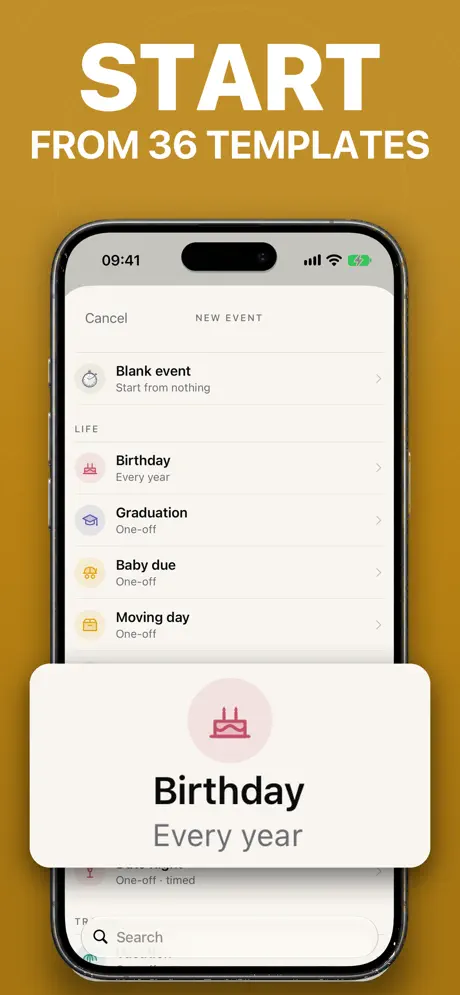
Start from a template
Countdown includes 36 ready-made events, from a birthday to a first day at work, each already configured with a sensible repeat and reminder. Picking one saves you from deciding how a birthday should repeat or when a reminder should fire — it is set up already, and you can still change any of it afterward. An exam or a trip is less likely to have an exact template match, but starting from the closest one and adjusting the name and date is still faster than building the reminders and repeat rule from nothing.
Choose how the date repeats
An exam or a trip is usually a one-off, but plenty of events come back on a schedule. Countdown supports:
- Yearly repeats, for birthdays and anniversaries.
- Monthly or weekly repeats, for recurring check-ins.
- Every few days, for anything on its own cycle.
You can also flip the direction and count up from a date instead of down to one — handy for tracking how long ago a trip happened, how many days into a routine you are, or how long since a milestone, rather than how long until it starts.
Set reminders before the day, not just on it
An exam benefits from a warning a week out; a trip benefits from one the night before you pack. Countdown lets you set a reminder for the day itself, and as far ahead of it as you want, so the same app that shows the number can also nudge you while there is still time to act on it, rather than only telling you something the morning it's already too late to prepare. The reminder and the widget can work together: the widget keeps the number visible day to day, and the reminder covers the moment you might otherwise be looking at something else entirely. Try the free days-until calculator if you just want to check a date before deciding whether it needs a reminder at all.
Make it look like the event, not a spreadsheet row
Countdown gives each event 200 drawn icons and the whole emoji keyboard to choose from, plus a hundred and forty full-screen backdrops — twenty-two of them photographs, and eighty-eight of the 140 in Countdown Pro. A birthday can carry its own icon and backdrop, an exam a different one, and a trip another, so the countdown for each one is easy to tell apart at a glance rather than reading the label every time — useful once you have more than one or two events on the same list widget and need to recognize them without stopping to read.
Get a card worth sharing when the day arrives
When a countdown reaches a milestone — a hundred days out, a week out, or the morning of — the app opens straight to that number, full screen, with a card worth sharing. For a birthday or a trip that's a ready-made way to mark the moment; for an exam it's a small, blunt reminder that the day has actually arrived.
Keep the story behind the date
Tap an event and it turns over to a page of its own, where you can write a few lines, add photos, or record a voice note — the story of the day, kept with the day. It syncs through iCloud, is included in every backup, and can be shared as a single picture, so an exam result or a trip memory stays attached to the countdown that led up to it. And because Countdown takes a snapshot of everything on the device every single day, with 30 days of history and one tap to restore, none of it depends on remembering to back anything up yourself — past events aren't deleted either, they collect into a timeline you can look back through.
If a birthday is already sitting in your calendar, or a list of exam dates is in a spreadsheet, you don't have to retype them one at a time, either — Countdown can import from a calendar, a spreadsheet, or another countdown app, and you can export your events again at any time, so switching to it doesn't mean losing dates you've already built up. See the full list of what's built in on the Countdown app page.