How to Turn a Travel Post Screenshot into a Day-by-Day Itinerary
Screenshot the travel post, paste the link, or just type out the plans, and BeforeGo: AI Itinerary Planner (BeforeGo) files it into a day-by-day trip plan on its own — the places worth seeing, the to-dos before you go, and each day the post lays out. You don't need to retype anything the post already spelled out.
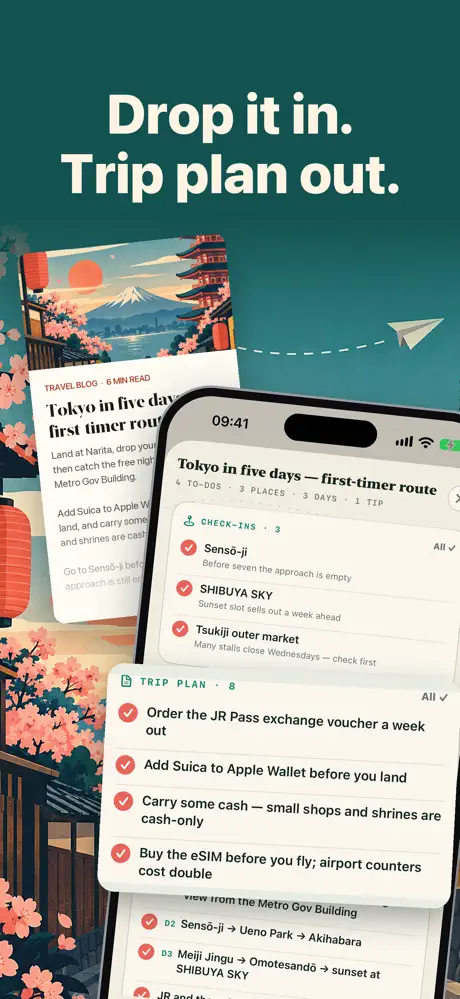
Three ways to hand BeforeGo your plans
BeforeGo accepts a travel post in whatever form you have it in:
- A screenshot of the post itself.
- A pasted link to the original page.
- Plans you just type out yourself.
Any of the three gets filed the same way, so you're not stuck retyping a plan someone else already wrote out for you, whether it came from a friend's message, a saved post, or a page you found while researching the trip. That matters most for the kind of post that's really a loose list — a string of restaurant names, a couple of neighborhoods worth a walk, a museum someone mentioned in passing — the sort of thing that's easy to save and easy to forget you saved.
What BeforeGo pulls out of a guide
Hand it a travel guide — screenshots, pasted text, or a link — and BeforeGo files what it finds: to-dos join the packing list, places join the trip checklist, and each day the guide describes joins the plan. The packing list also writes itself from the trip's destination and dates, so it doesn't need a separate step once the trip itself is set up. A single guide post often mixes all three kinds of information in one block of text — a thing to do, a place to see, and a suggestion for which day to do it on — and sorting that out by hand is exactly the kind of small, repetitive work that's easy to put off.
Scan tickets and bookings into the same plan
A ticket or booking confirmation lands on the plan the same way. Scan several at once and every flight, train and bus lands on the route in order, each with its own days — airports are placed using the code printed on the ticket rather than guessed, and a red-eye flight home ends the trip on the day it takes off rather than the day it lands. The editor for a new trip opens straight on its own fields, with the ticket scanner sitting right beside the trip's name, so scanning the first booking can be the very first thing you do — before you've even settled on which screenshots or links you want to add to the rest of the plan.
Every import stays organized and removable
Every import is listed under its trip, so you can see where a place, to-do or day came from — whether it was pulled from a screenshot, a link, or a scanned ticket. If something got pulled in that you don't actually want, any line it added can be removed, rather than having to redo the whole import or start the trip over.
Editing the trip after you've filed everything in
Plans change after the itinerary is already built, and Edit Trip covers more than the dates — it can also change the trip type and who's travelling. The checklist follows along automatically: rows the new answers need are added, and untouched rows the trip no longer needs are removed, so adding a travel companion or switching from a business trip to a family one doesn't mean rebuilding the checklist from scratch, or manually hunting down which rows are now out of date.
What the plan turns into once you're there
The places you saved become a trip checklist you check off as you go — spots, food and experiences — and a day of stops sorts itself into the shortest walking route. Voice notes transcribe themselves while you walk, so a thought doesn't have to wait until you're back at the hotel to be written down.
After the trip, the photos, notes and voice memos you added stay attached to it, and can become a printable memories album alongside keepsakes like luggage tags, tickets and trip receipts. BeforeGo is free to start, with no ads and no account required, and a one-time lifetime purchase is available if you'd rather not subscribe for the rest. It is made for personal travel organization, though: it does not replace official visa, safety, health, airline, or government guidance, so always verify important requirements with official sources before you travel. See the BeforeGo app page for the rest of what it does.